
Screenshots
App details
- Updated
- April 23, 2020
- Requires
- Windows 2003, Windows 10, Windows Vista,...
- Developer
- Crystal Dew World
- Category
- Mobile
SoftPas in:
This product is also available in the following languages:
About CrystalDiskMark
Download CrystalDiskMark – benchmark, disk speed, performance test, hard drive, SSD, storage test, utility
Overview
CreditDiskMark is a dedicated disk benchmarking tool designed to evaluate the performance of storage devices, including HDDs and SSDs. Its primary purpose is to deliver accurate measurements of sequential and random read/write speeds, enabling users to assess the real-world capabilities of their drives. This functionality is particularly valuable for diagnosing performance bottlenecks, verifying drive health, and comparing storage options before or after system upgrades. The app serves a broad audience, from technical users and system builders to casual users seeking to understand their device’s storage efficiency.
Developed by Crystal Dew World, the tool has established itself as a reliable utility in the productivity and system diagnostics space. It is especially useful in scenarios where storage speed directly impacts application loading times, file transfers, and overall system responsiveness. Whether verifying the performance of a newly installed SSD or troubleshooting a lagging drive, CrystalDiskMark provides actionable data in a straightforward format. Its long-standing presence in the market reflects its stability and relevance, making it a trusted choice for both professionals and enthusiasts.
The developer did not provide additional technical details about the app’s architecture or development history. Specific requirements were not listed. Compatibility information was not fully disclosed. Despite this, the app’s core function remains clear: to deliver precise, repeatable benchmark results for storage devices.
Key Features & Functionality
- Performance Measurements: CrystalDiskMark evaluates both sequential and random read/write speeds using standardized test patterns. This allows users to understand how their drive performs under different workloads, such as large file transfers (sequential) versus multitasking with small files (random).
- Flexible Test Data Selection: Users can choose from multiple test data types, including Random, 0Fill, and 1Fill. This enables simulation of various real-world conditions, such as fresh drive initialization (0Fill) or heavily used storage (1Fill), offering a more comprehensive performance profile.
- Multi-Language Support: The application supports multiple languages, improving accessibility for non-English-speaking users. This feature ensures that users worldwide can navigate the interface and interpret results without language barriers.
- Theme Customization: CrystalDiskMark allows users to modify the interface theme, enhancing visual comfort and personalizing the experience. This small but meaningful feature contributes to sustained usability during extended testing sessions.
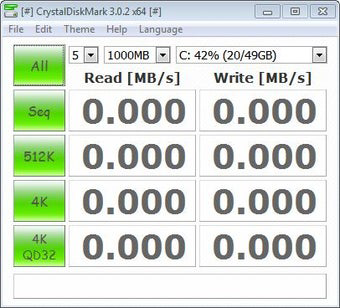
- Comprehensive Benchmark Options: The software includes a variety of test configurations, such as 512KB, 4KB, and 4KB at Queue Depth=32. These settings enable granular analysis of performance under different I/O loads, which is essential for advanced diagnostics and comparative testing.
Each feature is designed to provide real-world insights. For example, testing with 4KB at Queue Depth=32 simulates high-demand environments like database servers or virtual machines. Similarly, using 0Fill helps determine how a drive performs when freshly formatted, which is critical for system deployment planning.
Interface, UX & Performance
The user interface of CrystalDiskMark is clean and focused, prioritizing functionality over visual flair. It features a straightforward layout with clearly labeled controls, test selection options, and real-time result displays. Navigation is intuitive, allowing users to quickly configure tests and initiate benchmarking without confusion.
Visual design is minimalistic, with a consistent color scheme and readable typography. The interface adapts well to different screen sizes, ensuring clarity on both standard monitors and high-resolution displays. Although the developer did not list formal performance metrics, the application runs efficiently, consuming minimal system resources during testing.
Responsiveness is maintained throughout the benchmarking process, with immediate feedback on test initiation and completion. Stability appears consistent, as the tool does not exhibit crashes or freezes during standard usage. However, the developer did not specify minimum OS requirements or performance benchmarks for different hardware configurations.
Platform Compatibility & Technical Requirements
CrystalDiskMark is available for Windows platforms. The current version is 8.2.1, with a file size of 2.4 MB. The app is offered free of charge, making it accessible to a wide user base.
The developer did not specify minimum OS requirements. Compatibility with different Windows versions was not disclosed. Although the app is lightweight, no information was provided about hardware prerequisites or supported storage types beyond general functionality.
Pros and Cons
Pros
- Free to download and use with no hidden costs.
- Lightweight file size (2.4 MB) ensures quick installation.
- Supports multiple test configurations for detailed performance analysis.
- Multi-language interface enhances global accessibility.
- Minimal system resource usage during operation.
Cons
- Platform limited to Windows; no support for Android or iOS.
- Developer did not provide detailed technical specifications.
- Compatibility with older Windows versions was not confirmed.
- Interface lacks advanced customization beyond theme selection.
- No built-in reporting or export functionality for benchmark results.
FAQ
Is CrystalDiskMark safe to download and install?
Yes, CrystalDiskMark is a legitimate utility developed by Crystal Dew World. It does not contain malware or intrusive behavior. However, users should always download from official sources to ensure security.
Can I use CrystalDiskMark on Android or iOS?
Currently, CrystalDiskMark is only available for Windows. There is no official version for Android or iOS devices.
Does CrystalDiskMark require administrative privileges?
While the developer did not specify, benchmarking tools typically require elevated permissions to access low-level storage data. It is recommended to run the app as an administrator for full functionality.
How often should I run a disk performance test?
Users may run tests when installing a new drive, troubleshooting performance issues, or verifying system changes. Regular testing is not required unless performance degradation is suspected.
Can I export or save benchmark results?
The developer did not disclose export or save features. Results are displayed in real time and may need to be recorded manually for documentation.
Final Thoughts
CrystalDiskMark stands out as a focused, reliable tool for evaluating disk performance on Windows systems. Its ability to deliver accurate, multi-faceted benchmark data makes it indispensable for users who need to assess storage capabilities. While it lacks advanced features like result export or cross-platform availability, its simplicity, speed, and free access more than compensate for these limitations.
System administrators, hardware enthusiasts, and IT professionals will benefit most from its precise testing options and detailed output. Casual users seeking to understand their drive’s performance will also find value in its straightforward interface and clear results.
For anyone looking to verify SSD or HDD performance, diagnose system lag, or validate hardware upgrades, CrystalDiskMark delivers a powerful solution without cost or complexity. Its lightweight design and proven track record make it a must-have utility in any diagnostic toolkit.
Download CrystalDiskMark now
Guides & Tutorials
How to install CrystalDiskMark
- Click the Download button above.
- Once redirected, accept the terms and click Install.
- Wait for the CrystalDiskMark download to finish on your device.
How to use CrystalDiskMark
This software is primarily used for its core features described above. Open the app after installation to explore its capabilities.
User Reviews
No reviews yet. Be the first to share your experience.
You may also like
more
Que no te pillen¡
About !Que no te pillen¡Reviewed by Jason A. BilbreyShow MoreShow Less

3D Combat Zone
About 3D Combat ZoneOriginally released in 1983, 3D Combat Zone immerses players...

666: El día del portal
About 666: El día del portalOn June 6, 2006, Agent P. Stone uncovers a sinister...

80 in 1 Best Flash games
About 80 in 1 Best Flash games 80 in 1 Best Flash games is a collection of 80 fl...

ABYSS SEEKERーーWhat Do You See Deep in The Abyss
About ABYSS SEEKERーーWhat Do You See Deep in The AbyssIn ABYSS SEEKER, players...

ACA NEOGEO THE KING OF FIGHTERS 2002 for Windows
About ACA NEOGEO THE KING OF FIGHTERS 2002 for WindowsTHE KING OF FIGHTERS 2002,...